1
Jul
Investing in a Hp color laser printer
Investing in a Hp color laser printer Jet Pro Breakdown: M255dw vs. M282nw vs. M283fdn vs. M283fdw
Investing in a hp color laser printer is one of the smartest upgrades you can make for a busy home office or small business workspace. Laser technology puts an end to clogged inkjet nozzles, messy liquid cartridges, and smudged text. If you are hunting for a reliable mid-range machine, you have likely run into HP’s dominant 200-series lineup.
Four models frequently stand out in this category:
- HP Color LaserJet Pro M255dw
- HP Color LaserJet Pro MFP M282nw
- HP Color LaserJet Pro MFP M283fdn
- HP Color LaserJet Pro MFP M283fdw
Choosing between them can feel like alphabet-soup paralysis. They look remarkably similar on paper, use the exact same toner cartridges, and share an identical core printing engine. Yet, the price tags differ significantly.
This comprehensive, data-driven guide decodes HP’s naming conventions and breaks down the core specs, hidden operational differences, and cartridge dynamics to help you determine exactly which model fits your workflow and budget.
Decoding HP’s Printer Alphabet Soup
Before looking closely at individual models, you can decode HP’s naming conventions to understand exactly what each letter signifies.
- MFP: Multifunction Printer (it scans, copies, and sometimes faxes). If “MFP” is missing from the name, it is a single-function, print-only device.
- d (Duplex): The machine features an automatic internal mechanism to print on both sides of a sheet of paper without manual flipping.
- w (Wireless): Built-in Wi-Fi modules enable untethered connection to your network.
- n (Network): A hardwired Ethernet network port is present, but built-in Wi-Fi may be absent.
- f (Fax): Traditional telephony faxing hardware is included.
With these identifiers clear, you can spot the structural differences between these four models instantly.
Side-by-Side Specifications Comparison
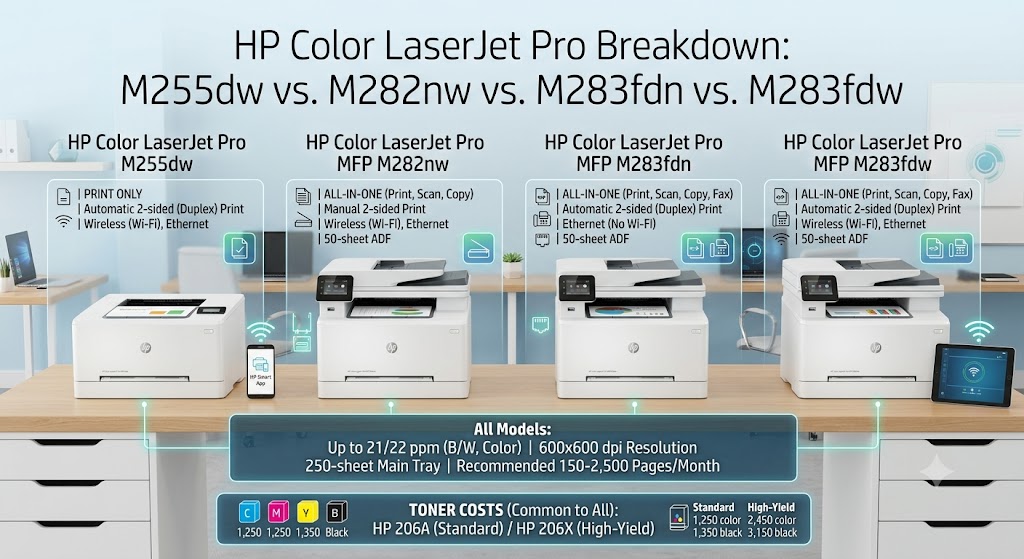
Because these machines share a foundational platform, their core performance stats match across the board. Every machine in this comparison delivers:
- Print Speed: Up to 21–22 pages per minute (ppm) for both black and color.
- Print Resolution: $600 \times 600$ dpi (enhanced via HP ImageREt 3600 software).
- Paper Capacity: A robust 250-sheet main paper cassette tray.
- Recommended Monthly Print Volume: 150 to 2,500 pages.
The divergence lies entirely in their hardware features, connectivity types, and document handling capabilities:
| Feature / Specification | HP Color LaserJet Pro M255dw | HP Color LaserJet Pro MFP M282nw | HP Color LaserJet Pro MFP M283fdn | HP Color LaserJet Pro MFP M283fdw |
| Primary Function | Print Only | Print, Scan, Copy | Print, Scan, Copy, Fax | Print, Scan, Copy, Fax |
| Auto 2-Sided Printing | Yes | No (Manual only) | Yes | Yes |
| Connectivity | Wi-Fi, Ethernet, USB | Wi-Fi, Ethernet, USB | Ethernet, USB (No Wi-Fi) | Wi-Fi, Ethernet, USB |
| Document Feeder (ADF) | None | 50-Sheet Simplex | 50-Sheet Simplex | 50-Sheet Simplex |
| Control Panel Display | 2.7-inch Color Touch | 2.7-inch Color Touch | 2.7-inch Color Touch | 2.7-inch Color Touch |
| Device Weight | 32.6 lbs (14.8 kg) | 41.2 lbs (18.7 kg) | 41.2 lbs (18.7 kg) | 41.2 lbs (18.7 kg) |
Detailed Model Analysis
1. HP Color LaserJet Pro M255dw: The Compact Print-Only Purist
The M255dw is unique in this lineup because it skips the bulky scanner bed completely. It is built strictly for high-yield, premium-quality printing.
- Who it’s for: Home office professionals, authors, students, or small offices that already own a dedicated scanner or rely entirely on phone apps for scanning documents.
- The Big Advantage: It is significantly shorter and lighter (weighing just 32.6 pounds) than its MFP siblings. It slips onto a standard shelf or desk extension without requiring a dedicated credenza. Crucially, it retains automatic duplex printing and dual-band Wi-Fi connectivity.
- The Catch: If you occasionally need to photocopy an ID card, a receipt, or sign and return a physical contract, this machine cannot help you.
2. HP Color LaserJet Pro MFP M282nw: The Budget All-in-One
Moving up into the multifunction family, the M282nw serves as HP’s entry-level multi-tool. It expands your capability to high-resolution flatbed scanning and high-volume photocopying via a 50-sheet Automatic Document Feeder (ADF).
- Who it’s for: Users who need scanning and copying tools over wireless Wi-Fi networks but print in low volumes or rarely require double-sided documents.
- The Big Advantage: It gives you the full scanner and copier ecosystem alongside dual-band Wi-Fi capabilities at a more accessible entry-level price point.
- The Catch: Look closely at the missing letters: there is no “d” in M282nw. This machine completely lacks automatic duplex printing. If you want a 10-page document printed on both sides, the printer will pause and prompt you via the screen to manually pull out the paper stack, flip it, and re-insert it. It also lacks an integrated analog fax machine.
3. HP Color LaserJet Pro MFP M283fdn: The Wired Corporate Cubicle Variant
The M283fdn reintroduces premium performance hardware—adding automatic duplex printing and an integrated fax line—but scales back on wireless radio options.
- Who it’s for: Corporate workstations, bank desks, medical offices, or heavily wired setups where standard IT security policies prohibit wireless printers on the corporate network.
- The Big Advantage: Full hardware capabilities. You get smooth, automatic double-sided printing, faxing, and high-speed copying. Because it relies on a hardwired network interface, network print job latency is virtually non-existent.
- The Catch: There is no built-in Wi-Fi hardware. You cannot place this printer across the room on a standalone table unless an active Ethernet wall-jack or router cable reaches it directly. AirPrint and mobile phone prints will only function if your phone connects to a local wireless router that is physically bridged to the printer’s LAN cable.
4. HP Color LaserJet Pro MFP M283fdw: The Flagship All-in-One
The M283fdw stands out as the ultimate iteration of HP’s 200-series platform. It offers a comprehensive feature set without compromises.
- Who it’s for: Small businesses, demanding home offices, and remote executives who need a versatile machine that handles any document task.
- The Big Advantage: Zero trade-offs. You receive effortless automatic double-sided printing, a 50-sheet automatic document feeder, traditional fax workflows, and dual-band Wi-Fi alongside Wi-Fi Direct for smooth printing right from your phone.
- The Catch: It commands the highest upfront retail price of the group and carries the larger, heavier physical footprint of the MFP family.
Understanding Toner Cartridges
No matter which of these four options you buy, your ongoing ink costs will be identical. All four models use the exact same toner family: HP 206A (Standard Yield) or HP 206X (High Yield).
Laser printers are a favorite for offices because toner powder never dries out or spoils. If you leave for a three-month vacation, your printer will start up and print flawlessly on day one. However, the upfront cost of genuine toner replacements can be substantial.
Toner Lifespan Estimates:
- HP 206A (Standard Black): ~1,350 pages
- HP 206A (Standard Color – C/M/Y): ~1,250 pages each
- HP 206X (High-Yield Black): ~3,150 pages
- HP 206X (High-Yield Color – C/M/Y): ~2,450 pages each
If your team prints hundreds of documents every month, you should plan to invest in the 206X high-yield cartridges. They offer a significantly lower cost-per-page over time compared to standard-yield choices.
Final Verdict: Which One is the Best?
There is no single winner; instead, there is a clear ideal choice based on specific workspace requirements:
- The Absolute Best Overall Printer: The HP Color LaserJet Pro MFP M283fdw. If your budget permits and space is available, buy this model. It retains its resale value, handles any document scenario effortlessly, and avoids frustrating feature limits down the road.
- The Best Value Option: The HP Color LaserJet Pro M255dw. If you only need to print, do not spend extra cash on a bulky scanner bed you will never use. The M255dw provides the exact same text and color quality as the top-tier flagship while saving you money and desk space.
- The Best Choice for Strict Network Environments: The HP Color LaserJet Pro MFP M283fdn. If your business operates a strict network environment or you prefer dependable, secure Ethernet cables over wireless connections, choose this model.
Avoid the M282nw unless it is heavily discounted. In modern work environments, skipping automatic double-sided printing can quickly become a daily annoyance and leads to unnecessary paper consumption over time.